

Alfred University Payment Plans
Affordable Education, Tailored for You
Alfred University has partnered with PayMyTuition (PMT) to offer an interest free payment plan to enable students or their families to make monthly installments on their student account towards tuition, fees and room and board. The payment plan is not a loan and is available for the fall and spring semesters for up to five automatic installments per semester.
Enrolling in this plan requires a non-refundable $30 fee per plan.
- Fall semester payment months: July, August, September, October, and November. Deadline to enroll is August 15.
- Five (5) payments if enrolled by July
- Spring semester payment months: December, January, February, March, and April. Deadline to enroll is January 15.
- Five (5) payments if enrolled by December
Please note: it will be up to the discretion of the Alfred University Student Accounts team if late enrollment will be allowed. The payment plan will automatically readjust if charges are added or removed from the student's account.
Key Features
- Enrollment fee: $30
- Payment Methods accepted: ACH, bank transfer, credit cards
- Customized payments: spread your tuition and fees over multiple installments.
- No interest: our payment plan is interest-free
- Flexible: families will have the flexibility to payment processing dates that are most suitable to your needs
- Easy enrollment: sign up in a few simple steps
- Returned payment charge: $25.00
Note: You will have 5 days to make up a declined payment. If you have two or more declined payments, you will be at risk of being removed from the plan and payment will be due in full.
Why choose Alfred University's Payment Plan:
- Affordable: break down the cost of your education into manageable installments
- Convenient: align your payments with your financial schedule
- No interest: our payment plan won't accrue interest charges
- Peace of mind: focus on your studies knowing your payments are taken care of
How it works:
- Enroll: make a one-time enrollment fee of $30 to get started.
- Make payments: submit your scheduled payments through our secure online portal. Note: international students will need to manually initiate installment payments through the PayMyTuition Payment Center.
Step-by-step enrollment process:
- Login: go to the MyAU homepage.
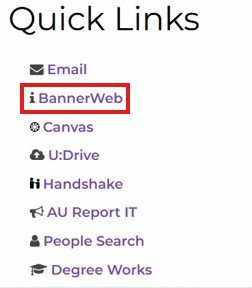
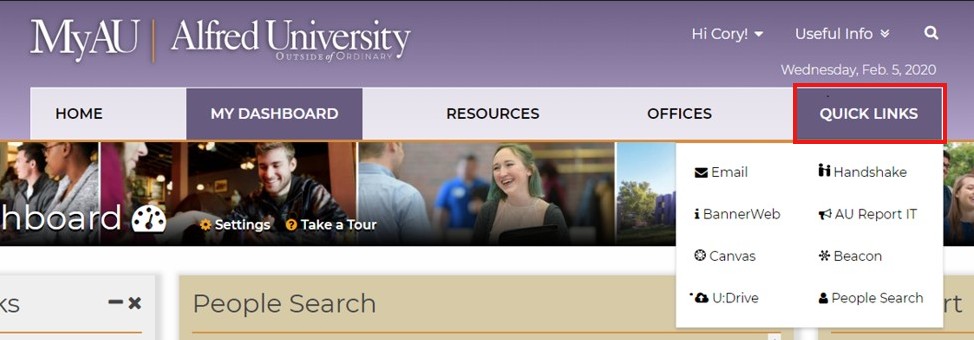 2. Navigate to Quick Links and select BannerWeb
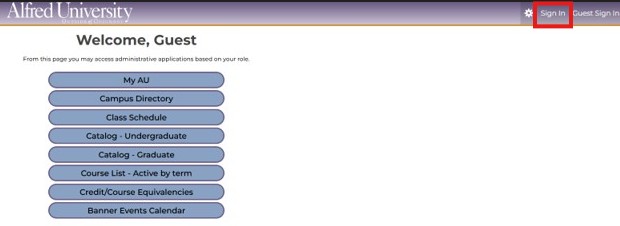
3. Select 'Sign In'
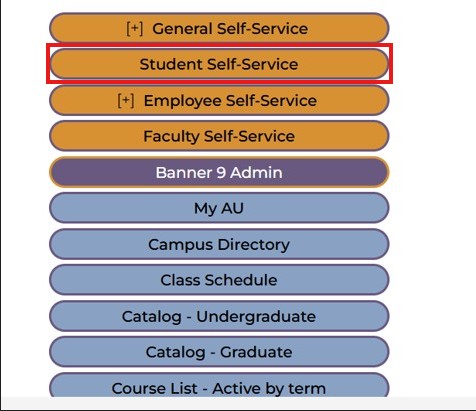
4. Select Student Self-Service
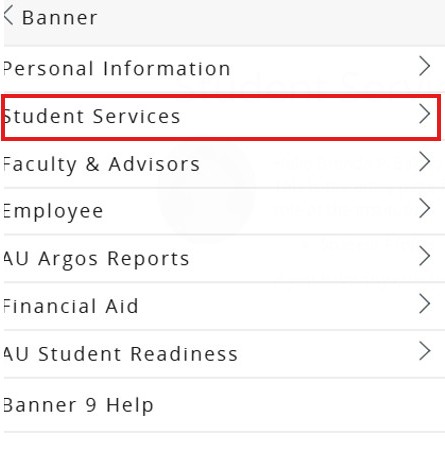
5. Select 'Student Services'
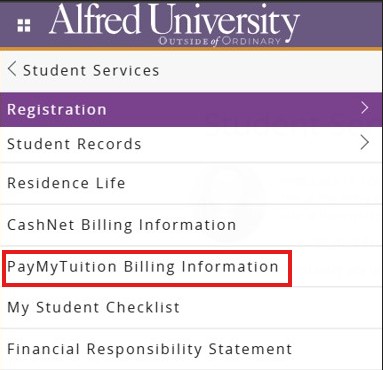
6. Next, click on the "PayMyTuition" banner to be redirected to the PayMyTuition portal.
Eligibility Check: Once you are redirected to the PayMyTuition Portal, you will see the Payment Center. Click here to make a payment and enroll in a payment plan.
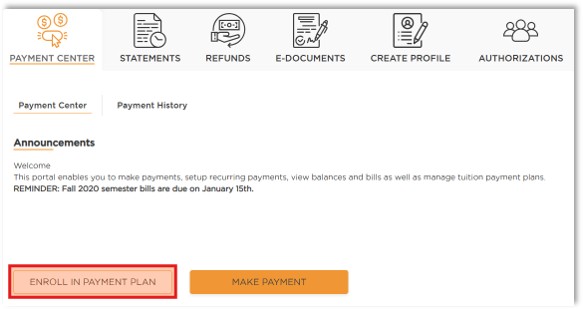
8. Here is where you will set up a payment plan. If the Enroll in Payment Plan button isn't visible, contact Alfred university's Student Accounts team at [email protected] or 607-871-2123.
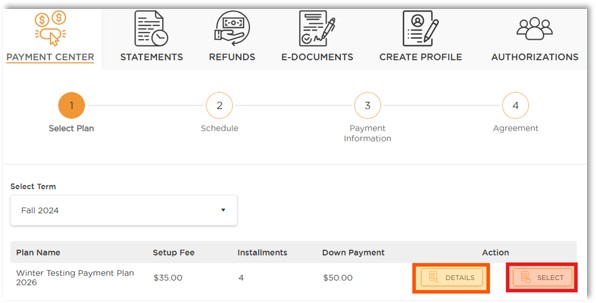
9. The payment center will default the 'Select Term' section to an eligible term for a Tuition Payment Plan. You can click the drop-down arrow to change the term you would like to enroll in a Payment Plan for.
10. Charge and balance review: Before enrolling, you can access a detailed breakdown of charges and see your existing balance. Make sure you're fully informed of all expenses before choosing a plan and completing your payment.
Step-by-step instructions on how to enroll in a payment plan (PDF)
Questions for the Alfred University Team?
Contact Alfred University student accounts at [email protected] or call 607-871-2123 to inquire about eligibility.
Alfred University Payment Plan Frequently Asked Questions:
Students and their authorized users can make changes to their payment plan within PayMyTuition's payment center. You will be responsible for any balance due on your student account after your payment plan has been modified or canceled.
Students and authorized users will not be permitted to cancel their payment plan on their own. Please contact the Student Accounts office to request for your payment plan to be canceled.
When you enroll, you will be required to enter either a checking/savings account or credit can number that will be used to automatically withdraw funds on your installment due dates. The payment method you choose will be used for all scheduled payments.
International students can pay from a domestic financial institution or card to schedule their payments. However, if paying from a foreign financial institution or card, the student is responsible for manually initiating their installment payment from the PayMyTuition payment center.