

Email is the main form of communication at Alfred University. Be sure to access your email on a regular basis to stay up to date on important information. Our campus utilizes Office 365 to power email accounts.
Getting Started with Email
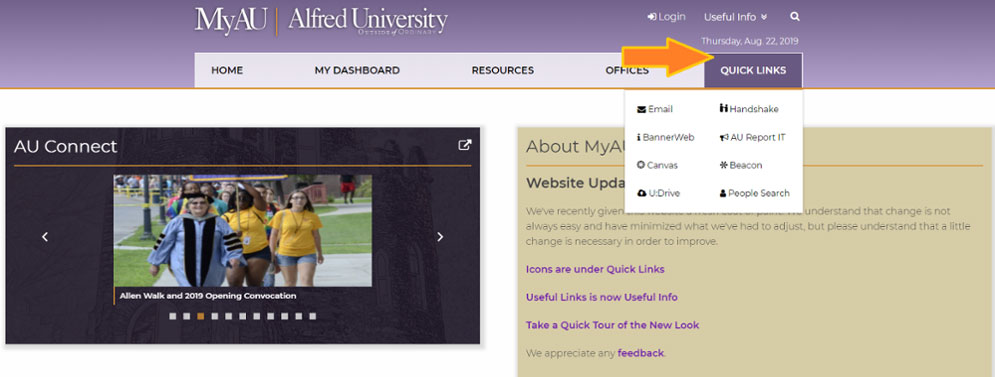
Emails can be accessed via webmail, or you can always find the "Email" link under the "Quick Links" option in the main navigation menu of the MyAU website.
Log in with your campus email address and password provided to you.
New Students
If you are a new incoming student you will get your Alfred University account during the admissions application acceptance process.
New Student Activation Process
Reminder: Be sure to keep working on completing the Accepted Students Checklist.
New Faculty/Staff
If you are a new faculty or staff member, you will work with the Human Resources office to get your account information set up.
Alfred University currently uses Microsoft Office 365 for email service. With this service you get more features and benefits than ever before. Benefits like a number of free installations of Microsoft Office products, like Word, Excel, and much more from the Microsoft Office Suite.
Setting up your email account on your mobile device is a slightly different process, but can be setup on both Android and iOS easily.
We have recently started implementing Multi-Factor Authentication (MFA), which is a significant deterrent to unauthorized email access, even when the password has been compromised. MFA is often described as "Something you know, and something you own." The something you know is the password portion and in our particular case, something you own will be a mobile phone number.
Please always remember that ITS will NEVER ask directly through email or through a linked web form for your username and password. Be extraordinarily suspicious of any email that asks for authentication credentials or ANY protected private information.
If you suspect an email might be possible spam or phishing, you can always forward it to [email protected] and ask if it is a valid email. We can directly assist you in verifying that the email is fraudulent.
Need an account for Student Club/Organization or Faculty/Staff Department?
For security reasons, you will be required to have a complex password and you will need to set a new one on a regular scheduled basis. But no worries, you will be notified when your password is about to expire.
Information on Changing Password
If you've accessed your email before, but have completely forgotten or lost your old password, then reset your password here.
Still Having Issues?
Contact the ITS Helpdesk at [email protected] or 607-871-2222.